
At 2 AM, nobody cares how your folders are labelled in theory. They care whether the right hydraulic schematic, pressure test sheet, and replacement part reference can be found before the machine stays down into the morning shift.
That's where most technical libraries fail. The drawing exists somewhere. The supplier certificate was emailed once. The maintenance log is probably in a binder, unless somebody scanned it into a shared drive called “old files”, or saved it to a desktop under “final latest use this”. In hydraulics, that kind of mess doesn't just slow admin work. It blocks fault-finding, creates rework, and leaves you exposed when an auditor asks for proof of component lineage or revision history.
Good documentation management isn't an office tidy-up exercise. In a UK workshop handling bespoke power packs, hard-to-find replacements, cross-referenced pumps, valve circuits, and field repairs, it's part of operational control. If your team can't trust the documents, they end up trusting memory. Memory is where expensive mistakes start.
Why Is Your Technical Library Working Against You
The pattern is familiar. A power pack trips out. The engineer needs the latest circuit drawing, relief valve setting, and assembly record. Instead of opening one clean record, they search through paper folders, a network drive that grew without rules, and a retired colleague's old folder that nobody has touched in years.
In that moment, the technical library isn't supporting maintenance. It's fighting it.
What bad documentation looks like on the shop floor
Poor documentation management rarely announces itself with one dramatic failure. It shows up in smaller operational losses that stack up:
- Outdated drawings in circulation: An engineer prints a schematic from an old revision and diagnoses the wrong valve path.
- Supplier records split across inboxes: Procurement has the certificate, engineering has the drawing, and service has neither.
- No clear master file: Three PDFs carry almost the same name, and nobody knows which one is current.
- Tribal knowledge replacing records: One experienced fitter knows the difference between two similar power units, but the system doesn't.
That's why generic “go paperless” advice falls short in hydraulics. A bespoke assembly often combines standard components with custom pipework, project-specific settings, and build-stage test evidence. If those records sit in separate places, traceability breaks.
According to MA Hydraulics on documentation and traceability in hydraulic systems, over 68% of UK industrial manufacturers report that paper-based or non-integrated documentation processes lead to traceability failures during audits, and 41% of service engineers cite missing documentation as the top cause of delayed machinery repairs.
Practical rule: If a technician can't find the right document in one search, your system isn't organised. It's just digitised clutter.
Why hydraulics firms get hit harder
Hydraulic documentation has awkward edges that many document systems ignore. One job may need a gear pump data sheet, a bespoke manifold drawing, a pressure setting record, a motor rotation note, and a customer-specific bill of materials. Another needs a cross-reference because the original part is obsolete and the replacement came from a different brand family.
That's where documentation management becomes a maintenance discipline, not an IT project.
A strong system has to support real workshop questions:
- Which drawing was used to build this unit?
- What changed between revision levels?
- Which pump, valve, filter, and bellhousing were fitted?
- Where is the test result for this exact assembly?
- Can we prove what was supplied and when?
If the answer to those questions depends on who's on shift, your library is working against you.
Auditing Your Current Documentation Chaos
Before you design anything new, you need a hard look at the old mess. This step is often skipped because of an eagerness to install software. That's backwards. If you migrate disorder, the new platform just gives you a tidier-looking disorder.
The right starting point is a document audit. Not a spreadsheet exercise for its own sake. A working audit that shows what you have, where it lives, who uses it, and whether it can still be trusted.
Start with document locations, not document types
Walk the business from the point of use backwards. Check the workshop office, production benches, purchasing folders, job packs, network shares, laptops, archived paper files, and service vans if needed. Don't assume the shared drive is the whole library.
I've found that the primary issue is rarely volume. It's duplication and hidden storage. The same installation sheet might exist in print, in a project folder, in an email attachment, and in a supplier download. If your team uses Vivoil installation instructions, for example, you want one governed location for the approved copy, not four uncontrolled copies drifting around the business.
Use three status buckets only
Keep the first pass simple. Every document goes into one of these categories:
| Status | What it means | Action |
|---|---|---|
| Active | Used for current operations, service, manufacturing, or compliance | Clean it, name it properly, migrate it first |
| Archive | Historically useful but not needed day to day | Retain with restricted editing |
| Obsolete | Superseded, duplicated, or no longer valid | Mark clearly and remove from live access |
UK recordkeeping has long treated documents as part of a controlled lifecycle. The Public Records Act 1958 and UK document lifecycle practice established a statutory framework around creation, classification, storage, retrieval, and disposal, and that mindset still fits industrial records better than the old “save everything somewhere” habit.
What to check during the audit
Don't just count files. Judge whether each file can be trusted.
- Version clarity: Can you tell which revision is current without opening three files?
- Ownership: Does one person or role control updates?
- Legibility: Are scanned drawings readable at the point of use?
- Completeness: Is the test log attached to the drawing set, or missing?
- Retrieval path: Can a maintenance engineer find it without asking around?
A document that exists but can't be trusted is operationally the same as a missing document.
Map the bottlenecks
The audit should also expose where work stalls. Typical choke points include engineering holding the latest drawings, purchasing holding supplier certificates, and service teams keeping hand-marked notes that never return to the central record.
Write those bottlenecks down. They tell you where the new system needs stronger structure, permissions, and workflow. Without that map, teams usually digitise the easy files and leave the risky ones untouched.
Designing Your Centralised Document Structure
A centralised structure only works if it matches how people search. Engineers don't think like software vendors. They look by machine, project, assembly, component family, or fault. If your structure forces them through six abstract categories before they reach a power pack test record, they'll work around it.
Build the library around retrieval speed first. Neatness comes second.
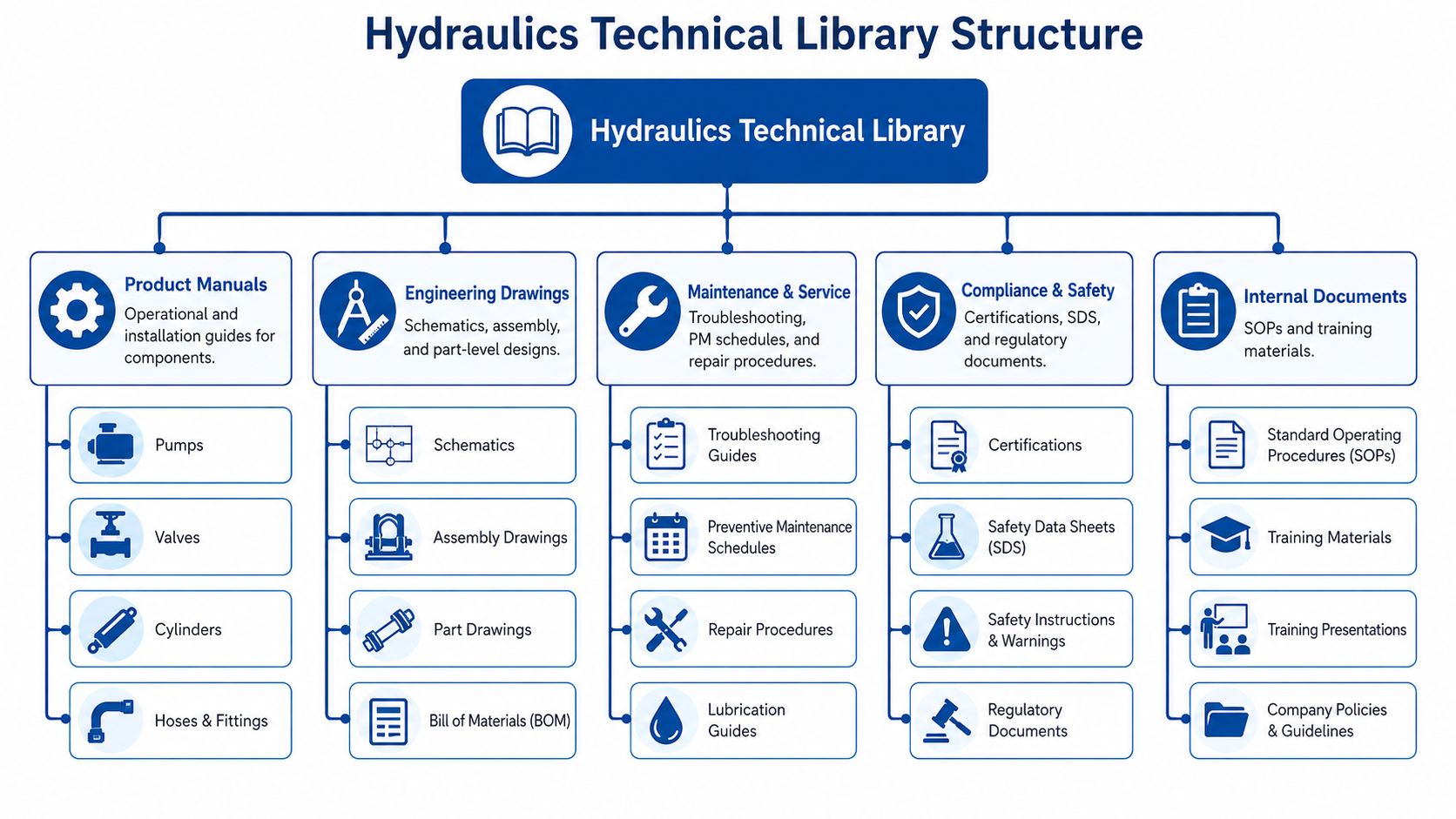
A useful visual model helps before you create folders in any system:
Pick one top-level logic and stick to it
Most hydraulic businesses are torn between organising by customer, by product, or by job. The answer depends on how your people retrieve information most often.
Here's a practical comparison:
| Structure | Best for | Weakness |
|---|---|---|
| By customer | Service-heavy work and repeat OEM accounts | Shared standard documents get duplicated |
| By machine or project | Bespoke builds and retrofit jobs | Component libraries can become fragmented |
| By system type | Product-led businesses with repeat assemblies | Customer-specific records can be harder to group |
In most mixed workshops, I'd use machine or project as the master spine, then link standard component documents from controlled reference folders. That keeps the build pack together while avoiding duplicate manuals all over the place.
For general reference material such as manufacturer literature and technical ranges, a governed catalogue area helps. A central bank of hydraulic catalogues and technical literature is far easier to maintain than scattering PDFs into every project folder.
A practical folder blueprint for hydraulics
For a bespoke hydraulic build, this structure works well:
-
01 Project Overview
Quote references, customer requirements, scope notes, approvals. -
02 Engineering Drawings
Schematics, manifold drawings, GA drawings, circuit layouts. -
03 Bill of Materials
Controlled BOM, alternates, cross-references, supplier identifiers. -
04 Assembly Records
Build instructions, torque notes, hose routing notes, workshop deviations. -
05 Test and Commissioning
Pressure tests, functional tests, inspection sheets, sign-off records. -
06 Compliance and Safety
Certificates, declarations, SDS where relevant, risk documents. -
07 Service History
Fault reports, parts replaced, field notes, revision feedback.
That structure works because it reflects the lifecycle of the asset. Design, build, test, support.
Build a reference library outside project folders
Don't bury every product manual inside a job. Keep a controlled technical library for recurring content:
- Pump manuals
- Valve data sheets
- Filter specifications
- Bellhousing and coupling dimensions
- Standard installation instructions
- Internal SOPs
Many teams achieve improved search speed. Instead of opening ten old jobs to find one CETOP valve sheet, they use a single reference area that holds the approved current version.
The video below gives a useful general view of arranging documentation structures before rollout.
Design for a new starter, not your longest-serving engineer
A strong test is simple. Give a new engineer a machine ID and ask them to find the latest schematic, BOM, and test log. If the structure is right, they should be able to access it without tribal knowledge.
The best document structure is boring. People find what they need, use it, and stop talking about the filing system.
If your folders require a long explanation, they're too clever.
Digitisation Naming and Version Control
Once the structure exists, true discipline begins. Many projects drift at this stage. They create the right folders, then allow random file names, mixed scan quality, and vague revision control. Within months, the digital library starts behaving like the old paper room.
Scan for use, not for archiving vanity
When you digitise technical paperwork, think about the person using it under pressure. A faint A3 hydraulic schematic reduced to an unreadable PDF is not digitisation. It's document burial.
For workshop and engineering records:
- Use clear source preparation: Remove staples, flatten folds, and separate mixed packs before scanning.
- Keep multi-page records together: Test sheets, approvals, and inspection notes should remain in one file where they belong.
- Check readability on ordinary screens: If line weights, handwritten settings, or stamped approvals disappear, rescan it.
Use a naming convention that survives growth
A file name should tell the user what the document is before they open it. It should also sort logically.
A practical format for hydraulics is:
[Project or Machine ID]_[System or Component]_[Document Type]_[Date]_[Revision]
Examples:
PP-1042_PowerPack_Schematic_2026-06-12_RevB.pdfAGR-778_GearPump_TestLog_2026-06-12_RevA.pdfMH-221_ValveBlock_BOM_2026-06-12_RevC.xlsx
The point isn't elegance. It's consistency.
Metadata is what makes the library searchable
File names help. Metadata makes the system useful at scale. The UK National Archives' digital preservation guidance warns that incomplete metadata undermines search and long-term retrieval, and for industrial documents the system should record creator, date, version, retention trigger, and audit trail to preserve authenticity, as summarised in Folderit's guide to document control best practice.
For hydraulic records, I'd add a few operational fields:
| Metadata field | Why it matters |
|---|---|
| Project or machine ID | Connects documents across build, service, and procurement |
| Component brand and model | Useful for cross-references and replacements |
| Document type | Separates manuals, drawings, test logs, certificates |
| Revision status | Stops obsolete files being used live |
| Retention trigger | Supports disposal and archive control |
| Approver | Shows who released the document |
If your office team already handles organizing meeting notes and transcripts for internal reviews, apply the same thinking here. A note, drawing, approval email, and test sheet all become easier to retrieve when the naming and metadata rules are shared across the business rather than invented by each department.
Keep version control simple and enforced
Version control fails when teams rely on naming habits alone. “final”, “final2”, and “latest” are warning signs that nobody owns release status.
Use these rules:
- One controlled current version: Only one live issue should sit in the official location.
- Archived superseded versions: Keep them, but separate them clearly from current use.
- Approval before release: Draft changes must not overwrite released records.
- Change notes: Record what changed and why, even briefly.
For controlled downloads, technical teams often benefit from one governed area for standard files such as manuals, certificates, and forms. A central technical downloads library makes it easier to maintain one approved copy instead of chasing attachments through email threads.
Implementing Access Controls and Workflows
Once the files are organised, you need to control who can view, edit, approve, and dispose of them. At this stage, documentation management stops being a filing exercise and becomes a governed system.
Too much access causes accidental damage. Too little access drives people back to local copies and unofficial workarounds.
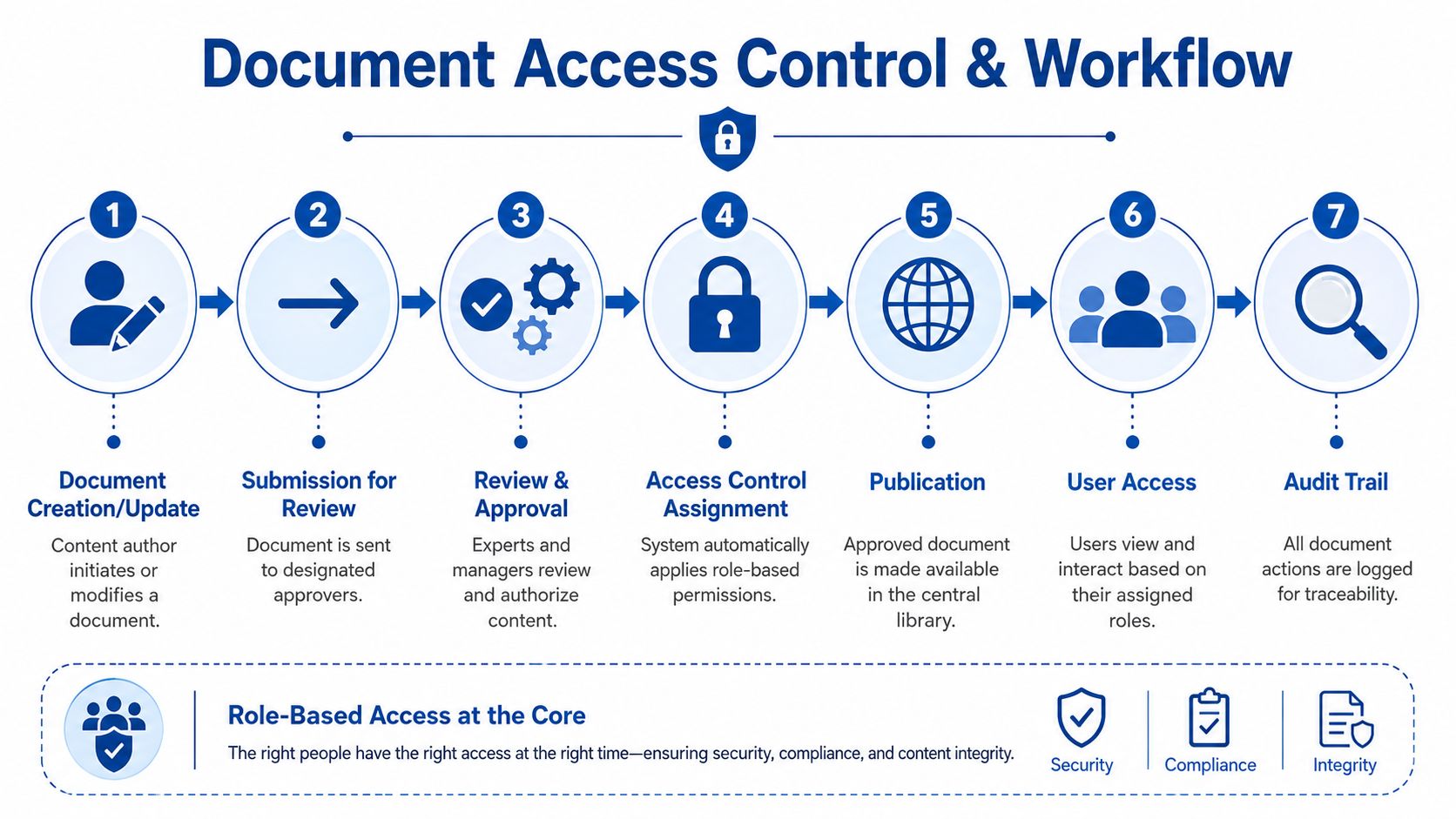
Set permissions by role, not by personality
Don't build the system around named individuals unless you have no choice. People move jobs, cover shifts, and go on leave. Roles are more stable.
A practical permissions model looks like this:
-
Workshop engineers
View released drawings, work instructions, manuals, and test forms. No delete rights on controlled records. -
Design or systems engineers
Create drafts, revise drawings, upload technical documents, submit for approval. -
Project managers or senior engineers
Approve revised documents, release current versions, lock superseded files. -
Procurement staff
View BOMs, approved supplier records, certificates, and purchasing specifications. -
Service teams
Read service history, upload field reports, attach photos or return-to-work notes.
This aligns with the practical control stack described in Hagerman's document management implementation guidance, which highlights a baseline audit, role-based access, enforced version control, and retention rules tied to legal obligations such as UK GDPR requirements to keep personal data no longer than necessary and protect it with appropriate technical measures.
Use a release workflow that matches engineering reality
A document workflow doesn't need to be complicated to be effective. In fact, complicated workflows usually fail because people bypass them.
Use a short release path:
- Engineer creates or updates the draft.
- System marks it as pending review.
- Senior reviewer checks technical accuracy.
- Approver releases it as current.
- Previous issue moves to superseded archive.
- Audit trail records who did what and when.
That's enough for most workshops.
If an updated schematic can be published without review, the system has a hole in it.
Where firms overdo it
Some teams try to automate every possible route from day one. They add exception rules, multiple approval layers, and notifications for everyone. The result is delay, confusion, and a growing pile of “temporary” local copies.
Start lean. Add complexity only when the process proves it's needed.
A useful wider read on this is AI-ready documentation strategies, especially if you're thinking beyond storage and towards repeatable workflows that prepare records for automation later on. The key is the same whether AI is involved or not. Clean ownership, clear approval, and visible status.
Retention has to be part of the workflow
Most workshops are good at saving records and poor at controlled disposal. That creates clutter and risk. If the system never retires anything, search quality drops and obsolete material hangs around far too close to live operations.
Set rules for:
| Record type | Suggested control question |
|---|---|
| Drawings | Is this current, superseded, or obsolete? |
| Test records | Does it belong to a specific assembly and service life? |
| Supplier certificates | Is it still linked to active stock or a past job only? |
| Personal data in service records | Is there still a lawful need to retain it? |
That's the difference between a document repository and a controlled document system.
Driving Adoption and Ensuring Audit Readiness
At 07:15, a fitter is standing over a failed hydraulic power pack, the machine is down, and the drawing on the bench does not match the manifold in front of him. That is how document control failures show up in maintenance. Not in a folder structure diagram, but in lost production time, wrong parts ordered, and awkward questions during an ISO or MHRA traceability check.
A central library only works if the workshop trusts it under pressure. If engineers still keep private PDFs, stores still relies on old print packs, or service engineers ring the same one person for the “right” drawing, adoption has not happened.
Train by job role, not by system feature
Generic training wastes time. In a hydraulics business, each role touches the library for a different reason, and the training needs to match that reality.
A workshop fitter needs to find the live schematic for a specific unit, confirm the revision, and record what changed after a repair. An engineer needs to upload a revised drawing for a bespoke Hydronit power pack without breaking the approval trail. Stores may need to check a part cross-reference where the OEM number is obsolete but the replacement stock code is still valid. Supervisors need to confirm who approved what, when it changed, and whether the old version was withdrawn properly.
Keep the sessions short and task-based:
- Workshop users: find current documents, check revision status, control printed copies, add service notes
- Engineering users: upload files, apply naming rules, submit revisions, maintain cross-references
- Stores and procurement: trace part substitutions, supplier documents, and approved alternates
- Supervisors and managers: review audit trails, release status, exceptions, and archive records
Then appoint floor champions. Pick people the team already trusts, ideally one from engineering and one from the workshop. They close the gap between formal process and what occurs on a busy day shift.
Measure the behaviours that expose failure early
Adoption is visible in daily work. If the right file appears quickly, if revision errors drop, and if printed copies stop circulating after changes, the system is doing its job.
Use a small set of checks that reflect workshop reality:
- Time to retrieve the current document for a live asset
- Percentage of active documents with a clear current revision
- Number of obsolete print copies found at point of use
- Time taken to update records after an engineering change
- Open audit actions related to document control or traceability
For UK hydraulics firms, I would add one more check. Test whether someone can trace a bespoke assembly from customer order to drawing revision, parts used, test record, and service history without asking three different departments. If that chain breaks, your system is not audit-ready, whatever the dashboard says.
Audit readiness is built in ordinary work. Every correct upload, approval, retrieval, and retirement decision strengthens it.
The importance of this beyond convenience
Poor documentation control creates compliance gaps very quickly in industrial maintenance. The common failure is not a total absence of records. It is a mix of half-controlled records, weak retention rules, missing cross-references, and no clear proof of which version was live at the time of build, repair, or inspection.
That is a serious risk if you are dealing with bespoke hydraulic assemblies, modified customer equipment, or legacy parts that have been superseded several times. During an ISO audit, or an MHRA-related traceability review where hydraulic systems support regulated equipment, you may need to show the exact drawing, certificate, test result, and change history tied to a specific unit. If any link in that chain depends on memory, the library is not under control.
Retention is usually where firms get caught out. Teams either keep everything forever, which buries live records in noise, or dispose of material with no written basis. If you need a practical primer on how long to keep business records, review the categories first, then align them to your contracts, audit requirements, and internal policy.
Keep audit readiness on a maintenance schedule
Treat the document system like any other controlled asset. Check it regularly, correct drift early, and do not wait for the week before the auditor arrives.
A workable routine looks like this:
- Monthly spot checks on live versus superseded technical files
- Quarterly review of archive growth and retrieval quality
- Access-rights checks after role changes, leavers, or contractor access
- Sample traceability tests using real jobs, including bespoke units and substituted parts
- Recorded checks that disposal decisions follow policy
The firms that stay ready do not rely on annual clean-ups. They run simple controls all year and fix small failures before they become audit findings.
Your Documentation Migration Checklist and Next Steps
Most documentation projects fail for one simple reason. They try to change everything at once. The better approach is staged migration with clear gates. Start with the records that affect maintenance response, build quality, and compliance first. The nice-to-have clean-up can come later.
This checklist is the version I'd print and work through with engineering, stores, service, and management in the same room.
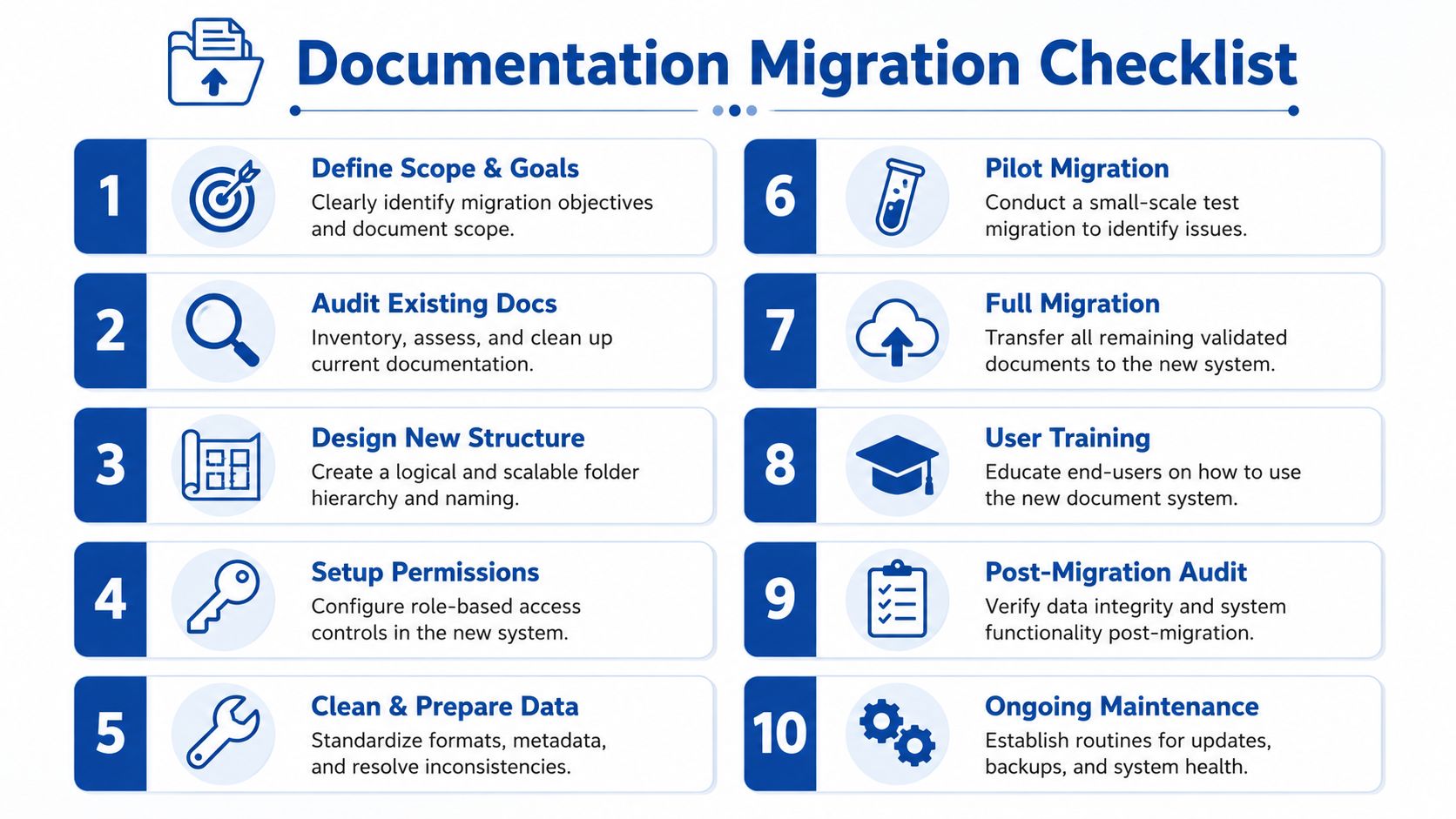
The migration checklist that works in practice
-
Define scope first
Decide what belongs in phase one. Focus on live technical records, controlled drawings, current manuals, test logs, and compliance-critical files. -
Audit what you already hold
Identify active, archive, and obsolete material. Flag duplicates, unreadable scans, and records with no clear owner. -
Choose the master structure
Settle the top-level logic once. By project, by machine, or by customer. Don't mix all three at the same level. -
Write the naming convention down
If the rule only lives in someone's head, it won't last. Create examples for drawings, BOMs, manuals, and service records. -
Define mandatory metadata
Keep it lean. Project ID, document type, revision, creator, approver, and retention trigger are enough to start well. -
Configure roles and permissions
Give each team the access they need, not broad write access just because it's easier. -
Pilot with one product line or project type
A pilot exposes weak naming, awkward workflows, and missing metadata before you scale. -
Migrate current records before archives
The team needs a working system fast. Put active information into use first, then backfill the history. -
Train by role
Show each group only the actions they perform. Retrieval for service, revision control for engineering, release approval for supervisors. -
Review after go-live
Check what users still can't find, where they create local copies, and which records continue to bypass the system.
Common mistakes to avoid
A few traps appear again and again:
- Moving everything without cleaning it first
- Keeping old folder habits inside a new platform
- Leaving revision control to file names alone
- Allowing shared generic logins
- Treating archive and disposal as somebody else's problem
None of these are technical problems. They're governance problems.
What good looks like after rollout
You'll know the migration is working when the workshop stops asking where documents are and starts assuming they'll be there. Engineers pull the current schematic without debate. Procurement checks the right specification from one place. Service teams can trace what was fitted and tested on a unit without opening five different systems.
That's when documentation management becomes useful. Not because the folders look tidy, but because the business runs with less friction and more confidence.
If your team needs help bringing order to hydraulic drawings, test records, cross-references, and bespoke assembly documentation, speak to MA Hydraulics Ltd. Phone 01724 279508 today, or send us a message to discuss your documentation needs.
